Cancel your subscription in two taps, anytime
From your account you see your next charge, download your invoices, change your card and cancel your plan without emailing anyone.
All plansWhat it is and what it is for
If you pay by card, your plan renews automatically at the end of each period (monthly or yearly, depending on what you chose). You can cancel anytime from your account: cancelling stops future charges and you keep your plan, your credits and everything you created until the end of the period you already paid for. After that your account moves to the free account and your projects stay saved. If you paid with an ePIN or crypto there is nothing to cancel: that payment covers one period and does not renew.
What it looks like

How to use it, step by step
Sign in at beellon.com and open your Account (the circle with your initial, top right).
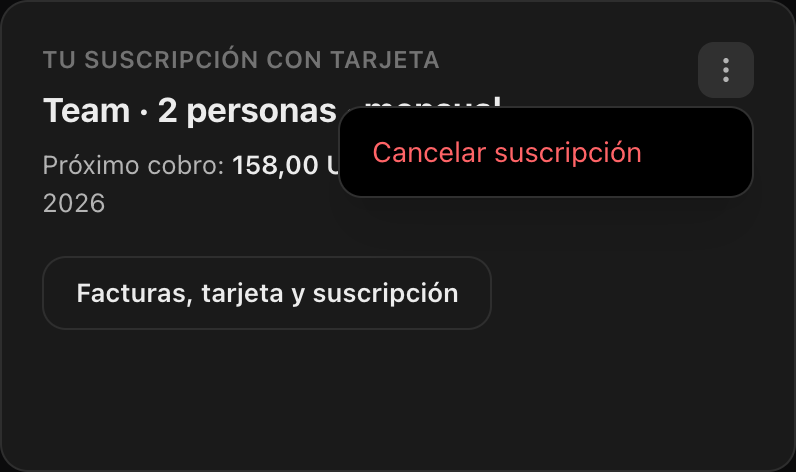
At the very top is the “Your card subscription” panel: your plan, how much is charged and the date of the next charge.
We ask you to confirm so it is never cancelled by an accidental tap.
Stripe, our payment processor, opens directly on the cancel screen. Confirm and you come back to Beellon automatically.
The panel will say “Cancelled: you keep your plan until…”. Nothing else is charged. If you change your mind before that date, you can reactivate it from the same button.
Tips for better results
- Cancelling deletes nothing: your images, videos, songs and projects stay in your account.
- You can use your plan credits until the end of the period you paid for.
- With the “Invoices, card and subscription” button you download all your invoices and change your card without cancelling.
- Business plans (Team and Scale): only the team owner cancels. When the period ends, members move to the free account and keep their projects.
- If you paid with an ePIN or crypto there is no auto renewal: you do not need to cancel anything.
- If you have a question about a charge, write to us from the Support tab of your account or in the Beellon chat.
Use cases
You no longer need it
Cancel and keep creating until the end of the period you paid for.
Take a break
Cancel now and activate a plan again whenever you want; your projects will be waiting.
Switch plans
No need to cancel: pick another plan in the same Plan & credits tab.
Change your card
Use “Invoices, card and subscription”: the subscription stays the same with the new card.
Related tools
How to cancel a Beellon subscription: Account, Plans tab, Your card subscription panel, three dots, Cancel subscription and confirm on the secure Stripe page. Cancelling stops auto renewal, you keep the plan and credits until the end of the paid period and your projects are not deleted. Also: download invoices, change the card, cancel Team and Scale plans, and ePIN or crypto payments with no auto renewal.
Start using Cancel your subscription
Create your Beellon account, activate your plan and use Cancel your subscription with AI today.
Create a free account