Flyers with Perfect text your exact words
AI creates the image of your product and Beellon sets your text with real type: no typos, your price front and center, and free edits.
All plansWhat it is and what it is for
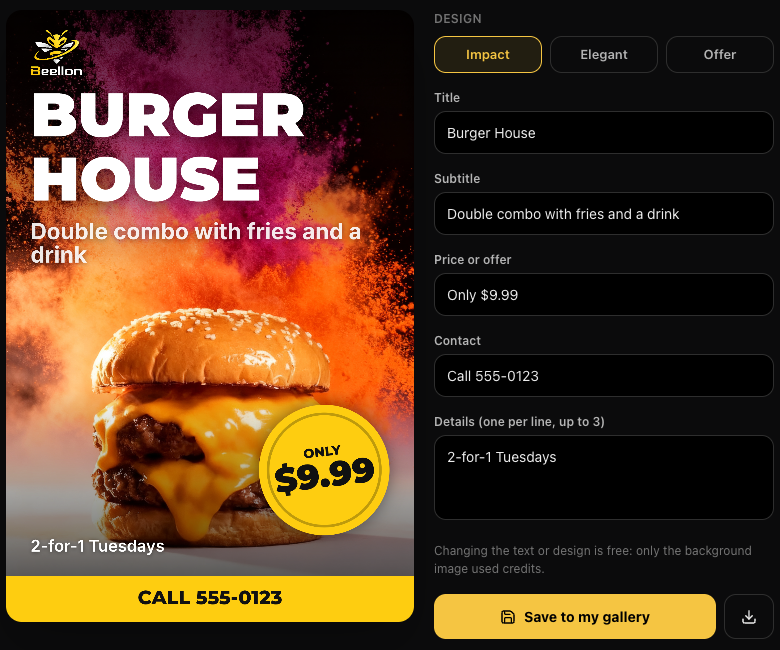
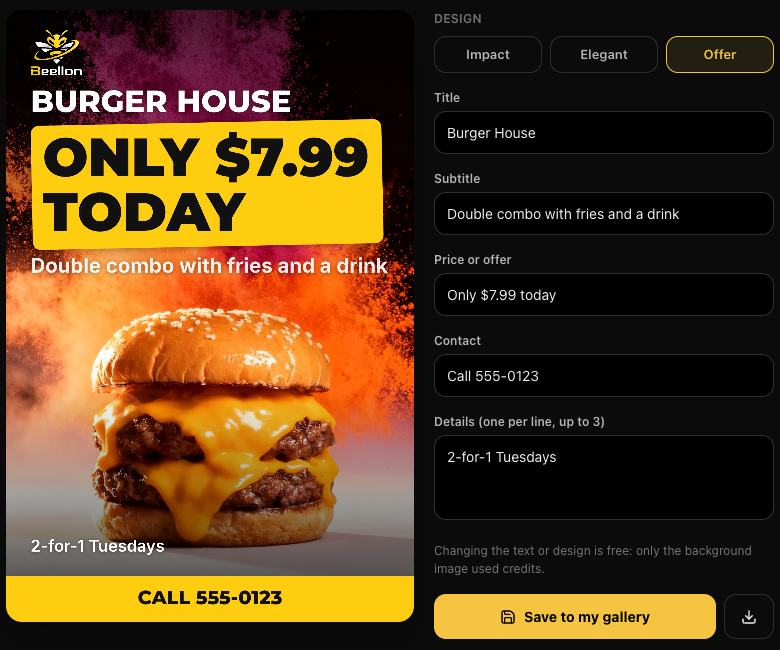
Image models draw letters and sometimes get them wrong. With Perfect text, AI makes only the scene —your product, the light and the background— and Beellon sets your text on top with real type, exactly as you wrote it. Your text is split into title, subtitle, price, details and contact; the price goes in a badge or a band in your brand color, and your logo sits cleanly at the top. Then you can change any word or pick another design (Impact, Elegant or Offer) and see it instantly, without spending more credits.
What it looks like
How to use it, step by step
In Images → Create Flyer upload 1 to 3 photos and, if you want, your logo or saved brand.
One idea per line: first the name or title, then what you offer, the price, the details and finally the contact. Choose the type (Sale, Promotion, Launch, Event or Service) and the style.
It is on by default. Tap Generate: in about 30 seconds AI creates the scene and Beellon builds your flyer.
Change any text in the fields or pick another design. You see it instantly and no credits are used.
«Save to my gallery» keeps it in your Gallery; the download button saves it in high quality.
Tips for better results
- It costs 2 credits for the background image; changing the text or design afterwards is free. If the image cannot be created, the credits come back automatically.
- Write the price with its sign or percentage («Only $9.99», «30% off») so it goes big in the badge.
- The contact (phone, website, address or @handle) goes in the bottom bar.
- It works for product flyers. For raffles, catalogs or photos of people the classic flyer is used.
Use cases
Restaurants and food
Today’s combo with the price in a badge you can read from afar.
Stores
Discounts and launches with your logo and colors.
Services and events
Date, time and contact written without errors.
Related tools
Perfect text flyers in Beellon: artificial intelligence creates the product image without letters and Beellon sets the title, price, details and contact with real type, with no typos. Impact, Elegant and Offer designs, free text editing, save to gallery and download.
Start using Flyers with Perfect text
Create your Beellon account, activate your plan and use Flyers with Perfect text with AI today.
Create a free account